
Learn how to collect payments on your chatbot with Vendy
| Time | Status | User Agent | |
|---|---|---|---|
Retrieving recent requests… | |||
Vendy WhatsApp Payment API Documentation
Overview
Vendy enables businesses to collect payments directly within their WhatsApp bot applications by generating payment links through a simple API call. Customers can conveniently complete their transactions by clicking a payment button presented in WhatsApp.
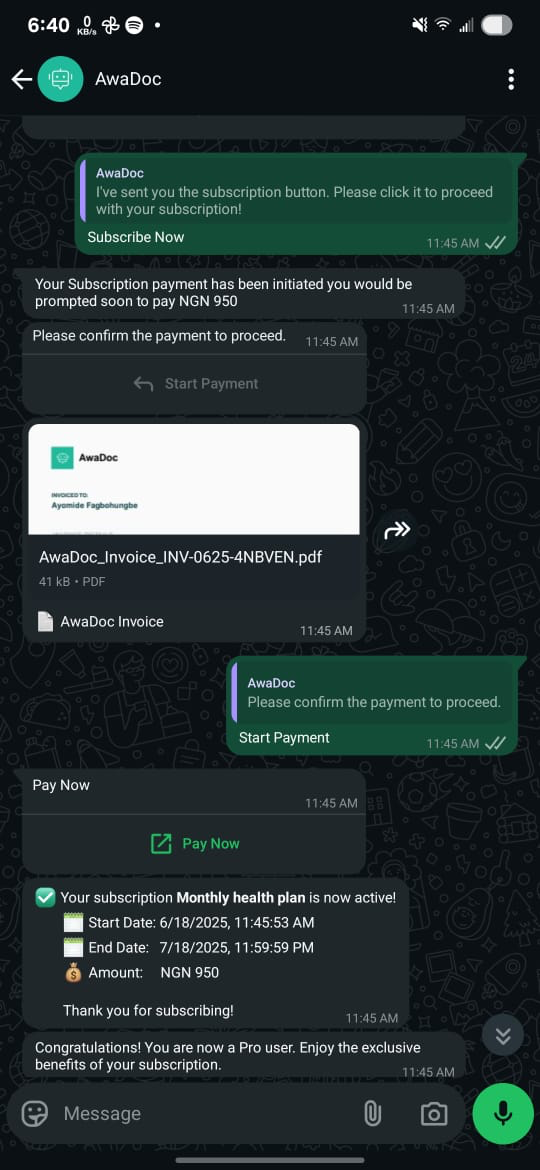
Sample WhatsAppBot Integration
API Endpoint
URL
POST https://api.myvendy.com/public/transactions/payment-urlHeaders
Content-Type:application/jsonAuthorization:Bearer <token>
Note:
<token>refers to your public key available at https://dashboard.myvendy.com/settings?tab=apis. JWT tokens are not required for this endpoint.
Request Body
{
  "amount": 100,
  "msisdn": "2348083042156",
  "currency": "NGN",
  "channel": "whatsapp",
  "device": "ios" <optional>,
  "meta": {
    "narration": "Payment for services",
    "custom-field": "your-custom-field",
    "transactionId": "your-transaction-id"
  },
  "product": "transactions"
}
Optional Parameter:
walletId: Specify if payment should go into a particular wallet (currency must match transaction currency).
Sample cURL Request
curl --location 'https://api.myvendy.com/public/transactions/payment-url' \
--header 'Content-Type: application/json' \
--header 'Authorization: Bearer <token>' \
--data '{
  "amount": 100,
  "msisdn": "2348083042156",
  "currency": "NGN",
  "channel":"whatsapp",
  "device": "ios",
  "meta": {
    "narration": "Payment for services",
    "custom-field": "your-custom-field",
    "transactionId": "your-transaction-id"
  },
  "charge_customer": false,
  "product" : "transactions"
}'
Successful Response
{
  "status": true,
  "code": 200,
  "msg": "Transaction Sent",
  "data": {
    "id": 605562920,
    "businessId": 994,
    "msisdn": "2348083042156",
    "requestamount": 100,
    "amount": 100,
    "method": "whatsapp",
    "currency": "NGN",
    "refid": "4213780500635415668",
    "meta": {
      "narration": "Request from Little Saints O for NGN100.00",
      "total": 100,
      "payment_link": true,
      "payment_methods": "sterling,fcmb_online,vendy_connect,kuda_pay,payment_card,transfer_pay,sterling_wallet,paystack_apple_pay,kuda_pay,opay_connect"
    },
    "businessName": "Your Business Name",
    "payment_link": "https://checkout.myvendy.com/pyr_y29t4hlgJBSMfgXQ"
  }
}
Steps to Create WhatsApp Payment Link Button
Step 1: Generate Payment Link
Make the above API call to generate the payment link.
Step 2: Use WhatsApp API
Utilize the WhatsApp Business API or any preferred WhatsApp bot service.
Step 3: Create Interactive Message
Construct a WhatsApp message template with an interactive url button.
Click here to follow the official Facebook guide; https://developers.facebook.com/docs/whatsapp/cloud-api/messages/interactive-cta-url-messages
Step 4: Send to Customer
Send the generated WhatsApp message using your WhatsApp API provider.
Example:
curl 'https://graph.facebook.com/v23.0/106540352242922/messages' \
-H 'Content-Type: application/json' \
-H 'Authorization: Bearer EAAJB...' \
-d '
{
  "messaging_product": "whatsapp",
  "recipient_type": "individual",
  "to": "+16505551234",
  "type": "interactive",
  "interactive": {
    "type": "cta_url",
    "header": {
      "type": "image",
      "image": {
        "link": "https://www.luckyshrub.com/assets/lucky-shrub-banner-logo-v1.png"
      }
    },
    "body": {
      "text": "Tap the button below to see available dates."
    },
    "action": {
      "name": "cta_url",
      "parameters": {
        "display_text": "Pay Now",
        "url": "{{replace vendy payment url}}"
      }
    },
    "footer": {
      "text": "Powered by Vendy"
    }
  }
}'
Webhooks
Configure your webhook URLs at: https://dashboard.myvendy.com/settings?tab=webhooks.
This allows you to receive transaction status updates and manage transactions effectively.
For further details or support, visit your Vendy dashboard.
Possible errors;
| Error code | Description |
|---|---|
| 326 | Business not found |